ProNames Hub / AppsAll apps

ANDROID · PAPER TINT & DIMMING

Paper Display

Your apps.
A softer palette.

A subtle paper-colored layer for reading and everyday phone use. Keep tapping and scrolling in supported apps, and tune the tint to your preference.

Download Android APK

Version 1.1.0 · 42,501 bytes
Android 8.0+ · Free · Signed release
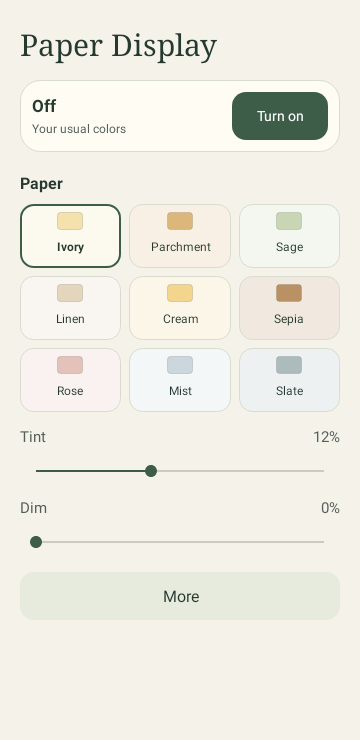
Paper Display’s compact Android controls with nine paper swatches, an on/off control, and separate paper tint and dimming sliders.
Preview rendered from the app’s Android views.
Appearance varies by device.

PAPER

Nine paper shades

Ivory, Parchment, Sage, Linen, Cream, Sepia, Rose, Mist, and Slate. Adjust paper tint from 0 to 30%.

SIMPLE

More room for controls

A compact screen with paper swatches, sliders, and an on/off control. Help stays in the More menu.

DIM

Dimming up to 50%

Adjust extra dimming separately. The single layer stays below Android’s touch-blocking opacity limit.

OFF

Easy to switch off

Stop from the app, notification, or Quick Settings tile. When off, the tile opens the app to start.

GET STARTED

A few simple steps.

Android asks for permission before one app can draw over another. Paper Display checks that access before starting.

  1. Install or update

    Download Paper Display below. If you already use it, choose Update without uninstalling to keep your settings. Keep Play Protect enabled. If Android asks, temporarily allow Install unknown apps for your browser, install the APK, then turn that browser permission off again.

  2. Allow the overlay

    Open Paper Display and tap Turn on, then Open Android settings. Allow Display over other apps for Paper Display and return. If your phone does not offer this permission, the overlay cannot run on that device.

  3. Choose your paper

    Choose from nine paper swatches, adjust tint up to 30% and extra dimming up to 50%, then turn Paper Display on. Allow notifications to keep the notification off switch visible.

  4. Keep an off switch handy

    Turn the overlay off in Paper Display or its notification. Add the Paper Display tile through Android’s Quick Settings editor for quick access.

COMPATIBILITY

Know the coverage.

For compatible Android phones and tablets. Ordinary permission setup is all you need.

What your device needs

  • Android 8.0 or newer with Display over other apps available; phones and tablets are supported by the package
  • User-granted overlay access; notifications are recommended for the notification off switch
  • No root, ADB, developer setup, account, or internet connection required to use the app

What to expect

  • Paper Display adds a translucent color and dimming layer over supported apps. It does not change your display into e-ink, remove reflections, or convert content to true grayscale. No medical or eye-strain benefit has been verified.
  • For black and white, More opens Android’s Accessibility settings so you can select Color correction → Grayscale where available. Paper Display cannot control system-wide saturation or offer a 0–100% saturation slider. Android’s own color-correction options vary by device.
  • Protected screens and apps that block overlays may hide the effect or reject touches through overlays. Paper Display pauses while the phone is locked. System bars, the keyboard, and permission screens may remain unchanged. Turn the effect off for sensitive actions if needed.
  • Some Android Go editions, managed devices, and manufacturer software restrict overlay access or background operation. This release cannot bypass those restrictions.
  • The overlay does not read or adapt to page content. It tints images as well as text and does not redraw a reading app’s background. Higher settings can reduce contrast; keep them subtle.
  • The effect is intentionally smooth, without paper grain that could interfere with small text. Dimming is an overlay and does not change the phone’s brightness setting.
  • Automated checks cover permission flows, service behavior, and tint limits using simulated Android 8, 12, and 16 environments, plus native view rendering. Physical-device testing has not been completed; actual cross-app touch delivery, manufacturer-specific behavior, and long reading sessions remain unverified.

Switch it off

  • Turn off from the main app, notification, or Paper Display Quick Settings tile
  • Revoke Display over other apps in Android Settings to remove overlay access
  • Restarting or force stopping the app ends the overlay; you choose when to start it again

PRIVACY

Your reading stays yours.

RELEASE DETAILS

Verify your download.

Install updates from this catalog over your existing copy to retain preferences.

Package
com.pronameshub.paperdisplay
APK SHA-256
232D58684852AA254DB7EB152E7B3356661DE52DFCED2B64428B28F7BFEDCAB6
Signing certificate SHA-256
379E5BB5464C691D6AB74F64D7E5BC89978B24CA5EB8715A845C5B97F5225490